Designing an exhibition stall is an important part of preparing for a trade show or business exhibition. Companies need a booth that represents their brand, showcases their products and attracts potential customers. However, traditional exhibition stall design often involves multiple discussions, design revisions and waiting for visual renders before the final concept is ready.
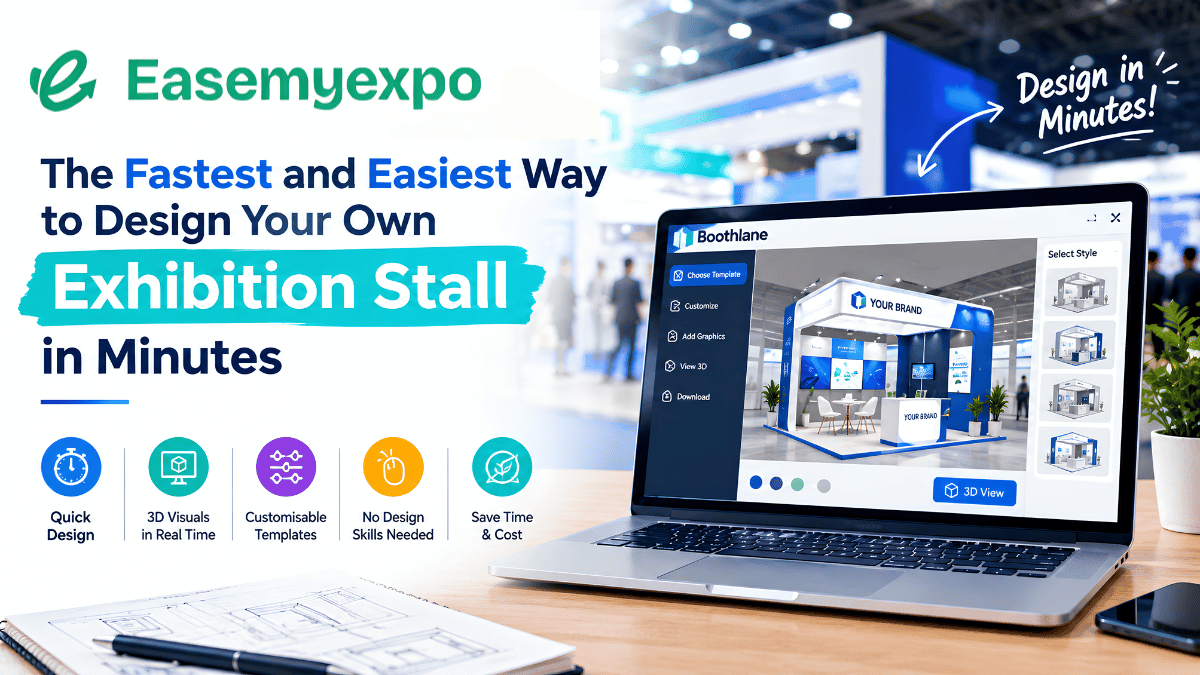
Boothlane, presented by EaseMyExpo, offers a digital approach to exhibition stall design.
The platform aims to make the design process more accessible for exhibitors, exhibition agencies and businesses preparing for upcoming trade shows.
With Exhibition Stall Design Software, businesses can explore design ideas more efficiently before moving forward with production and construction planning. Instead of relying entirely on lengthy design discussions, users can work with digital layouts and visual elements to develop a clearer understanding of their proposed exhibition space.
What Is Boothlane by EaseMyExpo?
Boothlane is an exhibition stall design platform developed for users who want to create and visualise exhibition booth concepts through a digital interface. The concept focuses on simplifying the process of designing a stall by bringing layout tools, design components and visualisation features into one workflow.
The platform’s promotional material highlights browser-based 3D stall design, customisable booth configurations, a catalogue of design elements and augmented reality (AR) preview capabilities. These features are intended to help users explore how a booth might look before making final decisions about its physical construction.
For businesses participating in exhibitions, this approach can make it easier to communicate design requirements, compare possible layouts and prepare for discussions with stall fabricators or exhibition service providers.
Boothlane is positioned for exhibitors who want a more direct way to explore booth concepts without relying exclusively on traditional design workflows.
Why Exhibition Stall Design Software Is Becoming Important
The exhibition industry is becoming increasingly competitive. Businesses invest in trade shows to generate leads, demonstrate products, build brand awareness and develop relationships with buyers. In this environment, booth design plays an important role in communicating a company’s identity and attracting visitor attention.
Traditional design processes may involve multiple stakeholders, including marketing teams, designers, project managers and fabrication partners. Changes to dimensions, branding, furniture placement or display arrangements can require additional coordination.
Exhibition Stall Design Software can help simplify the concept development stage by allowing users to experiment with layouts and visual elements digitally. A visual model also gives stakeholders a common reference when reviewing design proposals.
For small and medium-sized businesses, accessible design tools may help them explore professional-looking concepts before committing to a final production plan. For larger exhibitors, digital design workflows can support communication across marketing, procurement and event management teams.
Key Features of Boothlane
Browser-Based 3D Exhibition Stall Design
One of the key features highlighted in Boothlane’s promotional material is browser-based 3D booth design. This approach allows users to work on exhibition stall concepts through a web interface rather than depending entirely on locally installed design applications.
A three-dimensional view can help users understand the relationship between booth walls, counters, display areas, furniture and branding elements. This is useful when planning how visitors will enter the stand, move through the space and interact with displayed products.
A browser-based workflow can also make design concepts easier to share with colleagues and stakeholders, subject to the platform’s available sharing features and access permissions.
Customisable Booth Layouts
Different exhibitions have different space requirements. A compact promotional booth may need a counter and a branded backdrop, while a larger stand may require meeting areas, product displays, storage and demonstration zones.
Boothlane’s promotional material highlights support for exhibition stand configurations with one, two, three or four open sides. These configurations can help users explore how their booth might be arranged according to the available exhibition space.
The ability to visualise different layouts can be useful when planning visitor access, positioning key displays and allocating space for staff interactions. Final layouts should still be checked against the organiser’s technical guidelines, fire safety requirements and approved stand dimensions.
A Catalogue of Design Elements
The platform’s promotional material also refers to a catalogue containing more than 160 design items. A component catalogue can help users assemble a booth concept using available visual elements rather than developing every component from scratch.
Depending on the available catalogue, users may be able to explore furniture, display structures, counters and other booth components to create a more complete visual representation.
A ready-to-use catalogue can speed up early-stage design exploration. However, users should confirm the actual dimensions, specifications and availability of selected components before using the design as the basis for fabrication.
Augmented Reality Preview
Augmented reality can provide another way to understand a proposed exhibition stall. Boothlane’s promotional material highlights AR preview functionality, which may help users visualise a digital booth concept within a physical environment using a compatible device.
This type of preview can make it easier to discuss the appearance and scale of a design. It may also help stakeholders understand the relationship between a booth concept and the surrounding space.
AR previews are visualisation aids rather than substitutes for technical drawings, structural calculations or on-site measurements. Users should confirm the platform’s device compatibility and preview requirements before relying on the feature.
High-Quality Rendering
The Boothlane promotional poster highlights high-quality rendering and promotes the ability to generate a render in under 15 minutes. Actual rendering time may depend on design complexity, system performance, image settings and the platform’s current capabilities.
Faster visualisation can help design teams review concepts and communicate proposed booth appearances more efficiently. It can also support discussions about branding, lighting, colours and display arrangements before construction begins.
Users should verify the rendering specifications and expected processing times for their chosen plan and design requirements.
How to Design Your Exhibition Stall Using Boothlane
Step 1: Define Your Exhibition Requirements
Before beginning the design process, identify the exhibition name, available booth dimensions, number of open sides, brand requirements and primary business objectives. Decide whether the stall will focus on product demonstrations, lead generation, networking or meetings with potential customers.
Having these details ready can help create a more relevant booth concept.
Step 2: Select the Booth Configuration
Choose a layout that matches the allocated exhibition space and access requirements. A one-side-open booth may be appropriate for certain inline spaces, while corner, peninsula or island configurations may require additional open sides.
Confirm the exact stand type and dimensions with the exhibition organiser before finalising the layout.
Step 3: Customise the Design
Explore the available design catalogue and add suitable components to the layout. Consider the position of branding, counters, product displays, furniture and visitor interaction areas.
Keep the design aligned with the company’s identity and ensure that essential information is visible from the expected visitor approach.
Step 4: Preview the Booth in 3D
Use the available 3D visualisation features to review the booth from different angles. Check whether the layout provides sufficient space for visitors, staff and product demonstrations.
Review the placement of key visual elements and make adjustments where necessary.
Step 5: Review the Design With Stakeholders
Share the concept with relevant team members, clients or exhibition partners using the platform’s supported review or export options. Collect feedback on branding, layout and functionality before approving the design.
Step 6: Prepare for Production
Once the concept is approved, coordinate with the exhibition contractor or fabricator to confirm construction materials, structural requirements, electrical needs, lighting, graphics and installation schedules.
A digital design provides a starting point for production planning, but the final construction documents must meet the venue’s technical and safety requirements.
Who Can Benefit From Boothlane?
Exhibitors and Business Owners
Businesses participating in trade shows can use exhibition design tools to explore booth concepts and communicate their requirements more clearly. A visual model can help marketing teams assess how the stand supports product presentation and brand recognition.
Exhibition Stall Designers
Design professionals may use digital tools to develop initial concepts, compare layouts and communicate proposals to clients. The usefulness of the workflow depends on the platform’s design flexibility and its ability to support the required project complexity.
Exhibition Agencies
Agencies managing multiple clients may benefit from a more organised approach to concept visualisation. Digital layouts can provide a starting point for discussions about booth size, branding and visitor experience.
Marketing and Event Teams
Marketing teams can use booth visualisation to align exhibition participation with campaign objectives. Event teams can review whether the proposed layout accommodates demonstrations, meetings, promotional materials and visitor movement.
Startups and Small Businesses
Startups often need to balance exhibition budgets with brand presentation. A digital design tool can help them explore layout options and communicate their needs before committing to fabrication expenses.
Boothlane and the Future of Digital Exhibition Planning
Digital tools are changing how businesses prepare for exhibitions. Three-dimensional design, online collaboration and augmented reality can help bridge the gap between an initial idea and a physical booth.
Exhibition Stall Design Software also creates opportunities for more structured communication between exhibitors and service providers. Instead of discussing a design only through written descriptions, stakeholders can review a shared visual concept and identify changes more clearly.
As these platforms evolve, additional capabilities may include improved component libraries, collaboration tools, design templates and integrations with project management workflows. The availability of such capabilities varies by platform and should be confirmed before purchase.
For the exhibition industry, digital design tools can complement the expertise of designers, engineers and fabricators. They do not eliminate the need for technical validation, but they can make the early planning process more visual and accessible.
Important Considerations Before Choosing Exhibition Stall Design Software
Businesses evaluating a design platform should consider its usability, design flexibility, available components, export options and compatibility with their preferred devices. It is also important to understand the pricing structure, subscription conditions, project storage options and support arrangements.
Exhibitors should confirm whether the software produces only visual concepts or also supports dimensioned drawings and production-ready documentation. These are different requirements, and a rendered design alone may not be sufficient for fabrication.
Users should also verify claims about rendering times, AR compatibility and catalogue size directly with the provider. The right platform is one that meets the user’s actual project requirements and fits the budget.
Conclusion: Simplifying Exhibition Stall Design With Boothlane
Boothlane by EaseMyExpo represents a digital approach to exhibition stall design, bringing together browser-based 3D visualisation, configurable booth layouts, design components and AR preview capabilities highlighted in its promotional material.
For exhibitors, agencies and businesses preparing for trade shows, these tools can help make design concepts easier to explore and discuss. A clear visual plan can support better coordination before fabrication and installation begin.
As businesses seek more efficient ways to prepare for exhibitions, Exhibition Stall Design Software can become a useful part of the planning process. By combining digital visualisation with professional design expertise and technical checks, exhibitors can work towards booth concepts that reflect their brand, suit their space and support their business objectives.